Notebooks Don't Ship: How to Structure Your ML Project So It Can Actually Reach Production

You've probably lived some version of this…
You've been working on a model for a couple of weeks. It works. The metrics look good. You show it to your manager, and now they want you to hand it off so it can go live.
You start pulling the code out of your notebook and… you can't. Half of it is data cleaning cells you kept re-running. Another chunk is one giant train-and-eval block. Your feature engineering is split across three cells, none of which are functions. There's no way to run just the parts you need without opening Jupyter and clicking through them yourself.
You spend the next two days trying to turn a 400-line notebook into something an engineer can call. It doesn't go well.
Sound familiar?
This is where most models die. Not because the modeling wasn't good, but because the code around the model was never meant to leave your machine. How you structure your project on Day 1 decides how much friction you'll hit on Day 30, Day 60, and Day 180, when you (or someone else) needs to test it, deploy it, retrain it, or fix it.
Over the next five lessons, I'll walk you through the practices that get you from "model works in my notebook" to "model runs reliably in production." We're starting with the foundation: project structure. Get this wrong and everything after it becomes 10x harder. Get it right and the rest is almost mechanical.
Let's get to it!
The mental shift: your notebook is the workshop, not the product
Notebooks are a great environment to think in. They let you load data, poke at it, try things, and see the result immediately. That fast feedback loop is why every data scientist starts there. The problem is that notebooks are also a terrible environment to build production code in.
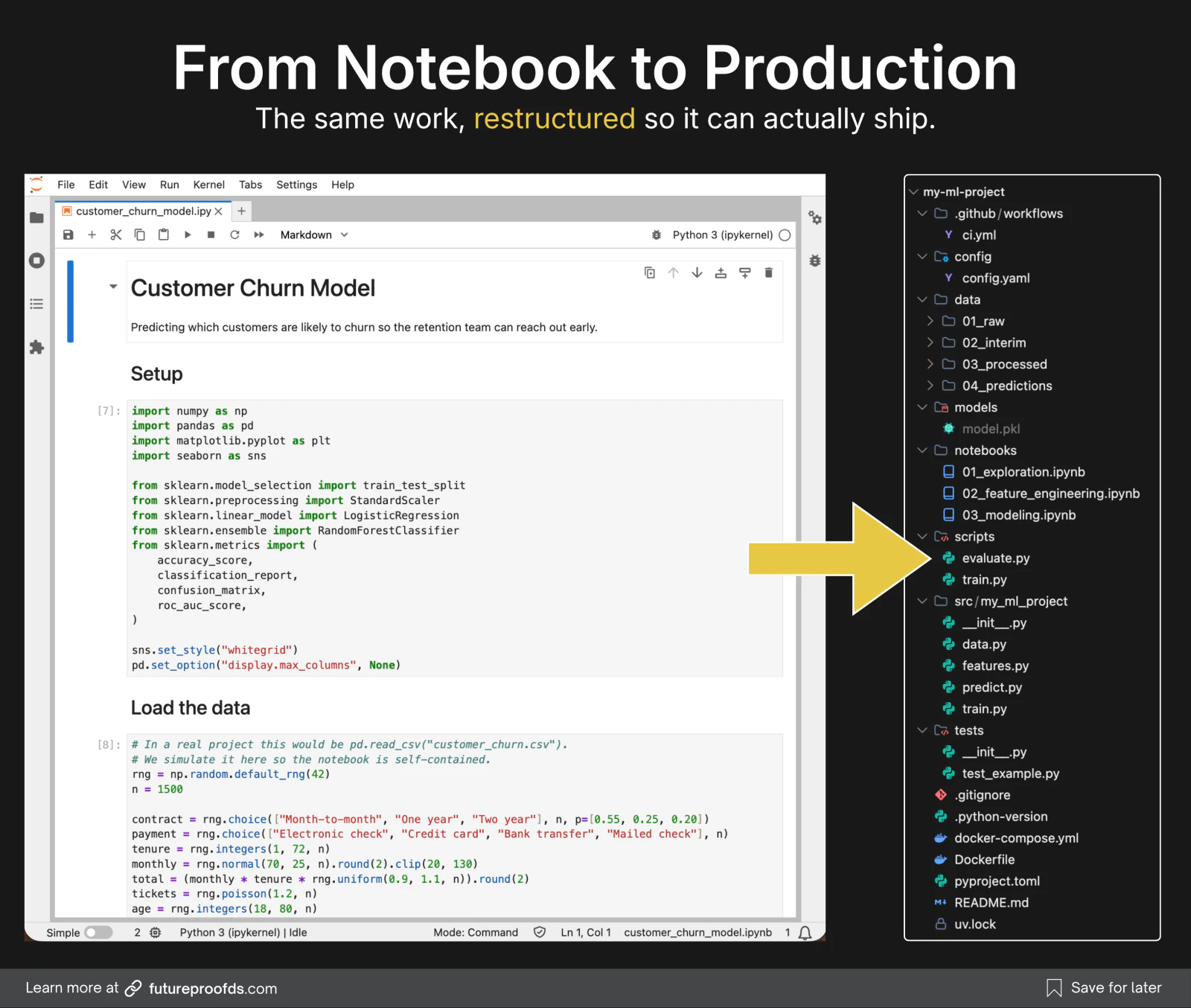
Here's what actually breaks when you try to move a notebook to production:
- State is invisible. You can run cells out of order and get results that only work because of what happened three cells ago. Someone else opening the notebook fresh can't tell which cell must run first.
- Code isn't reusable. Every variable and function lives in one giant global scope. There's no way for another script to import your
preprocess_data()function because it's not a function, it's a cell. - You can't test it. How do you write a unit test for cell 34? You can't. You'd have to run every cell above it first.
- You can't deploy it. No serious production system runs a Jupyter notebook. Your model has to be callable code that another program can invoke.
None of this is a Jupyter problem. Notebooks are doing exactly what they were built for: exploration and communication. The problem is that we treat the exploration as the finished product.
Here's the reframe that changes everything:
Your notebook is the workshop where you figure out what to build. Your Python modules are what you actually ship.
In practice this means:
- You explore data, try preprocessing approaches, test model architectures, all in the notebook.
- Once something works, you extract that logic into a
.pyfile as a proper function or class. - Your notebook becomes an orchestrator that imports from your modules and calls them. Not a monolith of copy-pasted logic.
This one shift is the single biggest thing separating data scientists who ship from data scientists who don't. It's not a tools problem, it's a mental model problem. Once you make this switch, everything downstream (testing, deployment, monitoring) becomes possible. Without it, none of it does.
💡 The rule I live by: If a piece of logic in a notebook works, has been tested, and I'll use it again, it should be a function in a
.pyfile within an hour. If I leave it in the notebook, I'll forget it exists, or I'll rewrite it slightly differently next time, and now I have two versions of the same thing.
How ML engineers actually handle this in 2026
Most data scientists haven't been taught this, so it's worth borrowing from the people who have: ML engineers and MLOps folks who've shipped models to real users. Here's the pattern that's emerged in practice, and where each version of it fits.
- Solo or personal projects: Most senior data scientists and ML engineers just run
uv init --packageand add the folders they need. Fast, no ceremony, no boilerplate they'll have to delete later. This is the modern default for anything you're building on your own. - Teams at mature ML orgs: Most companies with a real ML platform have an internal template built by their platform team. It's usually cookiecutter-based, encodes the team's conventions (specific CI setup, deployment patterns, monitoring hooks), and gets updated as the team evolves. If you join a mature ML team, you'll almost never start from scratch. You'll inherit theirs.
- Smaller teams or when starting fresh without an internal template: This is where Cookiecutter Data Science (CCDS) v2 still has a home. It gives you a comprehensive scaffold (
data/,notebooks/,docs/,references/, a Makefile, config files) with sensible defaults.
Also worth knowing: you can skip cookiecutter entirely and clone a GitHub template repo directly with gh repo create my-project --template owner/their-template --clone. Some teams prefer this because it's less magic and gives them a real repo to iterate on.
For the rest of this article, I'll walk you through the uv init --package approach because it's the fastest path from "empty folder" to "working environment", and it's what most solo work looks like in 2026. If you're on a team, use their template. If you want more scaffolding out of the box, use CCDS. The mental model I'm about to walk you through is the same regardless of which path you take.
Now let's look at what your project should actually look like once it's set up.
What "production-ready" project structure looks like
There's a specific pattern most ML teams have converged on over the past couple of years. It's not a formal standard, but if you look at how MLOps-mature teams organize their repos, you'll see the same layout again and again.
Here's the minimum viable version:
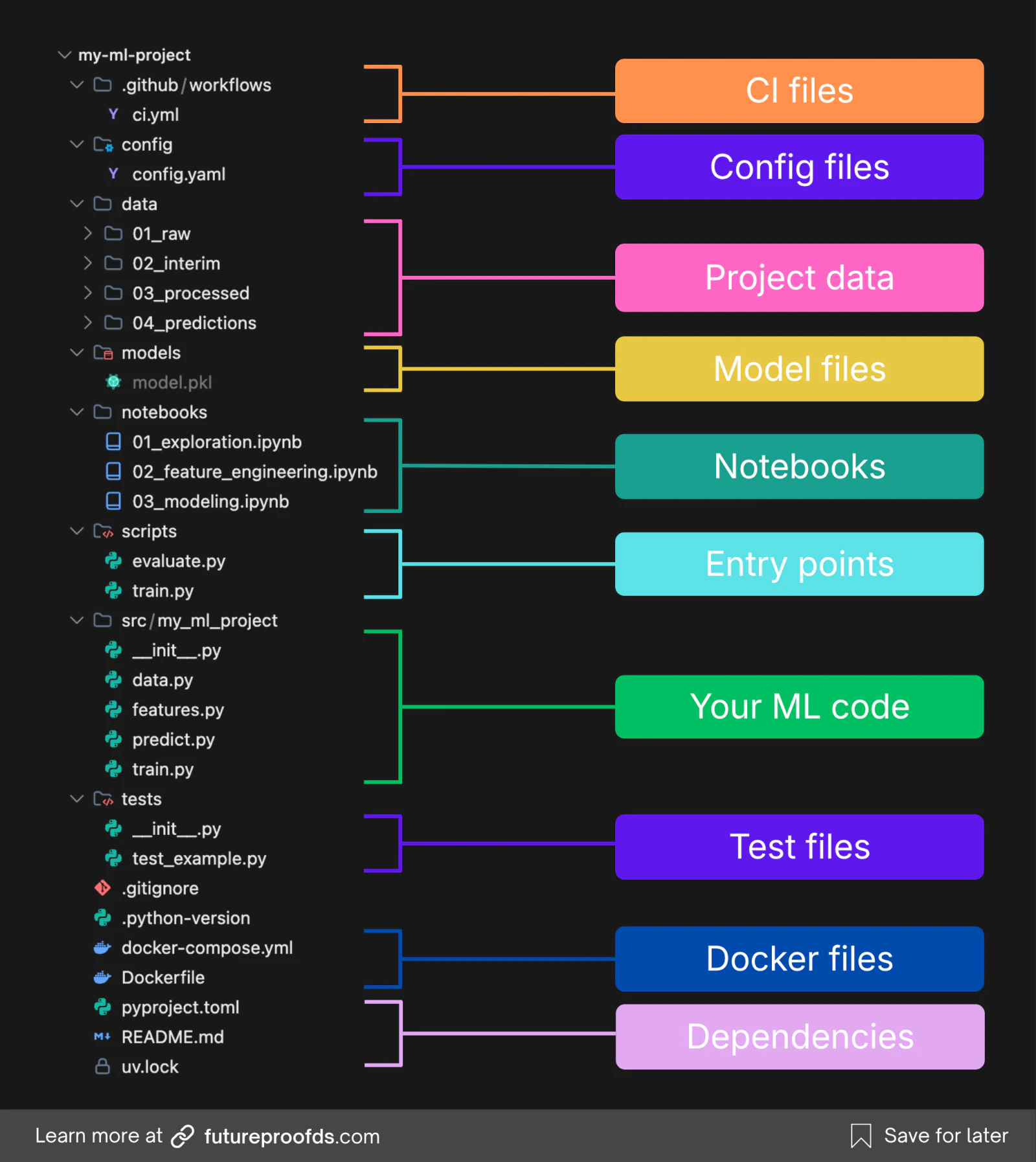
A few things worth noticing:
src/my_ml_project/is where your real code lives. This is called the "src layout." It looks slightly weird at first, but it exists for good reason: it forces you to actually install your own package, which surfaces import bugs early. Without it, Python will happily let you import files that wouldn't work in a real deployment.scripts/is how production actually runs your code. These are thin entry points, usually just a few lines each, that parse arguments and call intosrc/. When your training job runs on a schedule (Airflow, cron, Databricks, a Kubernetes job), it invokes a script, not a notebook. Keeping scripts thin means the real logic stays testable and reusable insrc/, while the script is just the trigger.notebooks/is separate from your source code. Notebooks live here for exploration and analysis. They import from yoursrc/package, not the other way around. If you're writing production logic inside a notebook, that's a signal to extract it intosrc/.data/01_raw/is immutable. You never modify files in it. Everything downstream is a transformation of it. This lets you always trace back to the source when something looks off. The numbered folders (01_raw,02_interim,03_processed,04_predictions) make the direction of flow obvious at a glance.config/is for configuration files. You won't need this right away. But the moment you're running more than one experiment with different hyperparameters, you'll want somewhere to put YAML configs (or Hydra, which is what most ML teams end up on). Plant the folder now, use it when you get there.pyproject.tomlis your single source of truth for dependencies. No morerequirements.txtwith unpinned versions. No moreenvironment.yml. One file that describes what your project is and what it needs.
Reading a folder tree is one thing; poking at it is another. Here's the same layout, clickable, with the reason each folder exists:
This structure gives you three things that a notebook-only setup can't:
- Reusability: Your
preprocess()function can be imported by your training script, your inference API, your tests, and any notebook, all reading from the same source. - Testability: You can write unit tests against
features.pybecause it's actual Python code, not cells. - Deployability: Your model-serving code can
from my_ml_project.predict import predictand it just works.
How to set it all up in one command
The good news: you don't have to build this structure by hand. uv init --package creates 90% of it for you in about two seconds.
Install uv once:
# macOS or Linux
curl -LsSf https://astral.sh/uv/install.sh | sh

# Windows
powershell -ExecutionPolicy ByPass -c "irm https://astral.sh/uv/install.ps1 | iex"
Then to start a new ML project:
uv init --package my_ml_project
cd my_ml_project
Why --package and not --lib? Both give you the same src/ layout. The difference is that --package also generates a CLI entry point, which matters for ML: it's how you get your training or evaluation code to be invocable as a command (my-ml-project train, my-ml-project evaluate). When your project moves to production and gets triggered by a scheduler (cron, Airflow, Databricks, Kubernetes), that entry point is what actually gets called.
That gives you:
my_ml_project/
├── src/
│   └── my_ml_project/
│       └── __init__.py
├── pyproject.toml
├── .python-version
├── .gitignore
└── README.md
The src layout, the pyproject.toml, the Python version pin. All done. The lockfile (uv.lock) shows up the moment you run uv sync or uv add, which you'll do in a minute. You just need to add the ML-specific folders (notebooks/, data/, tests/, models/) and start filling in the code.
Pin the Python version you want:
uv python pin 3.12Add your ML dependencies:
uv add pandas scikit-learn matplotlib
uv add --dev pytest ruff jupyter
The --dev flag puts things like pytest, jupyter, and ruff into a separate dependency group. You get them locally by default, and you leave them out of a production image with uv sync --no-dev. That keeps what you ship lean and reduces the surface area you have to worry about.
Now anyone who clones your project can get an identical environment with:
uv syncSame Python version, same package versions, same lockfile. No more "it works on my machine."
💡 Once you have this setup, notebooks in your
notebooks/folder can import directly from your package:from my_ml_project.features import build_features. This is the moment the mental shift starts to feel real: you're using the notebook to drive your code, not to be your code.
Try it on your own (Template)
Instead of building this structure by hand, I put together a project template that already has everything from this lesson: the src/ package layout, thin scripts/, notebooks/, tests/, config/, and the data/ folders, with dependencies locked by uv and tests and CI already wired up. The ML code is left as stubs, so you drop in your own project.
Here is a quick video walkthrough to give you a general overview:
Here's how to make it yours (about 5 minutes):
- Fork it, or hit Use this template on GitHub, to start a fresh project.
- Rename the package with two search-and-replaces across the whole repo:
my_ml_projectto your name in snake_case, thenmy-ml-projectto the hyphenated version. Then rename thesrc/my_ml_project/folder to match. The name appears in the scripts and tests too, not justpyproject.toml, so a find-and-replace saves you aModuleNotFoundError. - Implement the stubs in
src/(data.py,features.py,train.py,predict.py). Each one has aTODOmarking exactly what goes there. - Run it:
uv sync, thenuv run scripts/train.py.
Fork it once, and every project you start after this begins from the right structure, instead of drifting into a mess you'll have to untangle later.
Final thoughts
There's nothing glamorous about project structure. It's not the part of the job that gets you praised in reviews or noticed at conferences. But it's the part that decides whether your model ever leaves your laptop.
If you take away one thing from this lesson, let it be this: your notebook is the workshop, not the product. Everything I'll teach in the rest of the series assumes you've made this shift. Once your code lives in src/, you can wrap it in a service, track experiments against it, automate its deployment, and monitor it in production. Without it, none of that is possible.
If you want to see where all of this is heading, the system map draws the finished thing: the same project running in production, with every piece the rest of this series adds, and a build order you can step through one part at a time.
Next up: wrapping your model in a service. Because a model that only you can call isn't really a model anyone can use.
If you'd rather do this end to end with support and feedback, take a look at the ML in Production bootcamp.